External stages
A custom workflow stage normally runs beside Hub, consumes an
internal WorkflowRun from its stage queue, and returns that message to the
workflows engine. The workflow forwarder is the boundary for stages that run
in a customer-managed environment instead. It keeps the internal queue and
credentials inside Hub and sends the external service a smaller, versioned
invocation over the customer’s own RabbitMQ broker or HTTPS endpoint.
Use the forwarder when the external worker:
- runs outside the Hub cluster;
- must not receive Hub storage credentials or internal routing state;
- should consume from a customer-managed queue or API;
- needs to return data that can route the remaining workflow stages.
hub-workflows-forwarder, route a workflow stage to its queue, and select a
completion mode. Callback mode also requires a reachable Hub API URL.Design the workflow
- Select the organisation/project containing your Agent, open Workflows, and select Add Workflow. Enter a name and leave it disabled during setup.
- Keep Recording classified, the start block, in Automatic mode.
Drag Forward to my system from Blocks onto the canvas; its display
name may vary by deployment, but its operation must be
forwarder. - Drag from the start block’s output port to the forwarder’s input port.
- Select the connection’s Start when… badge. Expand Which recordings and select your Agent under Camera. Empty camera selection means all devices in scope. Leave Site, Camera group, Objects in recording, and optional activity/extra conditions unset for the first test. Under Active hours, select Always.
- Select Forward to my system to configure the external destination. Choose RabbitMQ under Provider, and enter your own Host, Port, Queue, Virtual host, Username, and Password. Use Use TLS outside an approved trusted local network. Custom workflows do not inherit the deployment’s broker, credentials, virtual host, or TLS overrides; shared deployment integrations are reserved for global workflows.
- Select Wait for result (
mode=callback) under Completion mode when the external worker will return analysis results. Complete after delivery (mode=delivered) finishes the stage without waiting for a callback. The destination queue must match the worker’s queue and be reachable by both services. The worker may use separate consumer credentials. - Select Create workflow to save the draft. Once your worker and callback token are ready, enable the workflow and select Save changes.
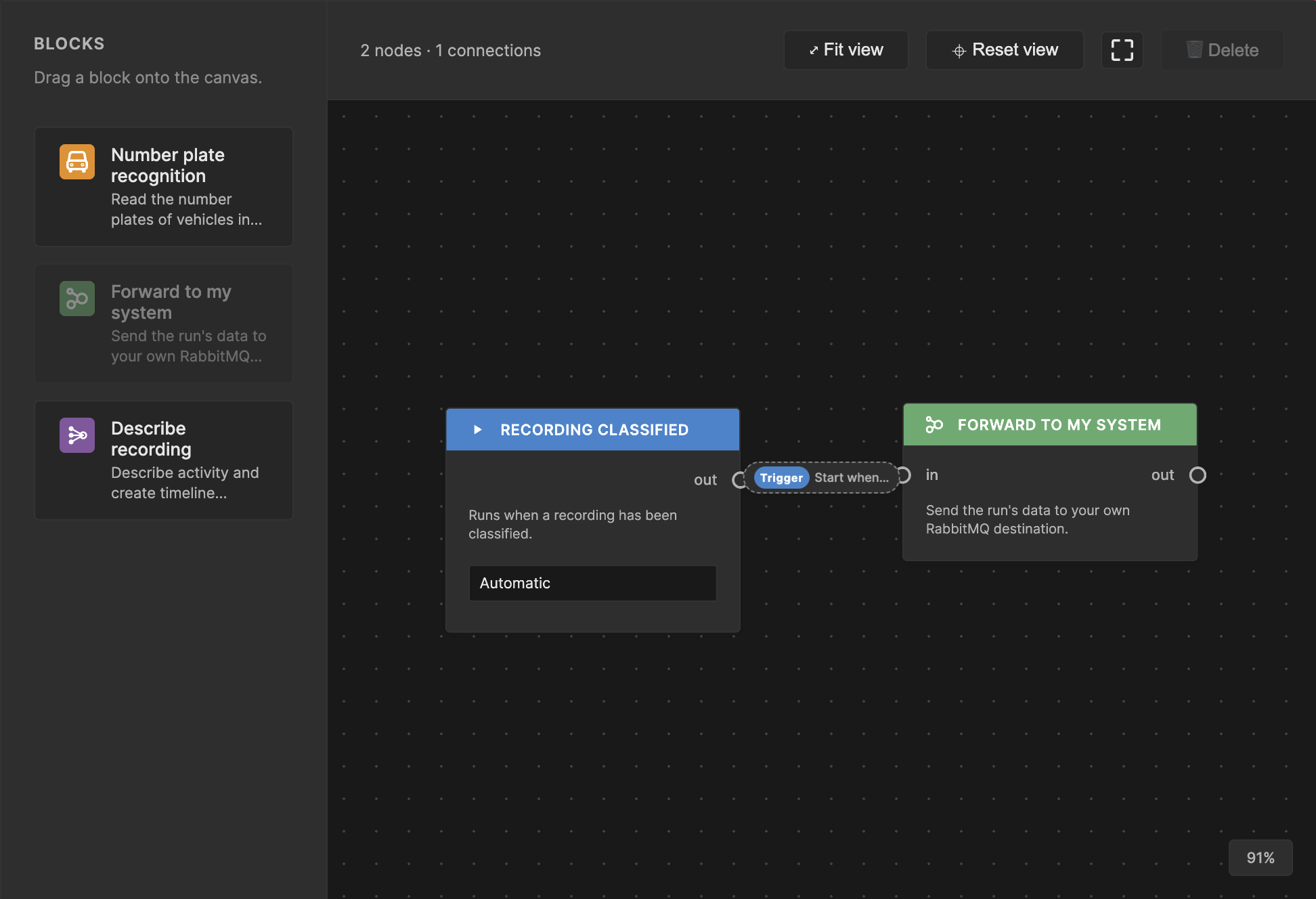
An unsaved example: connect the automatic start block to the external forwarder.
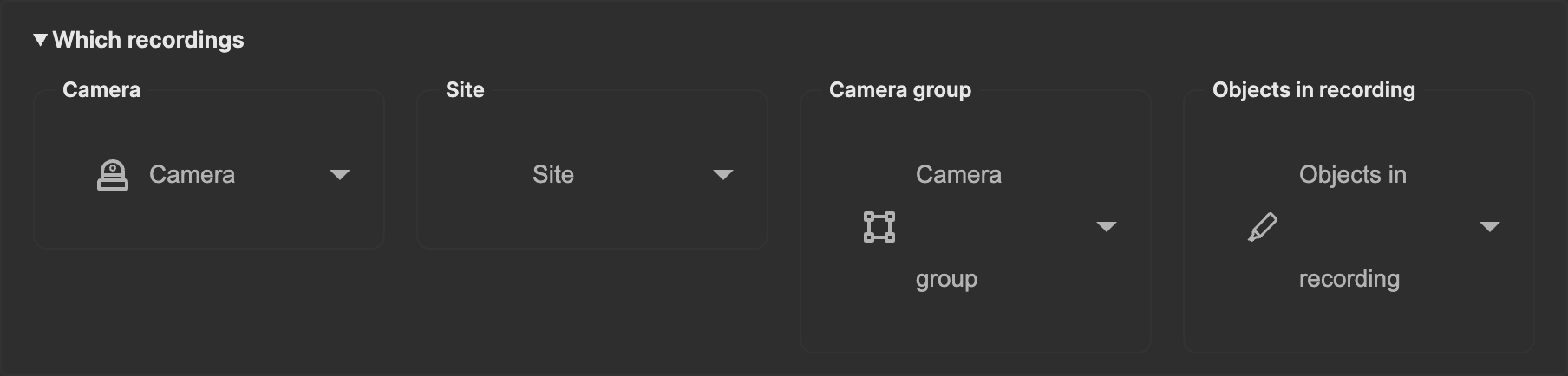
Select your Agent under Camera. Device names are intentionally omitted from this screenshot.
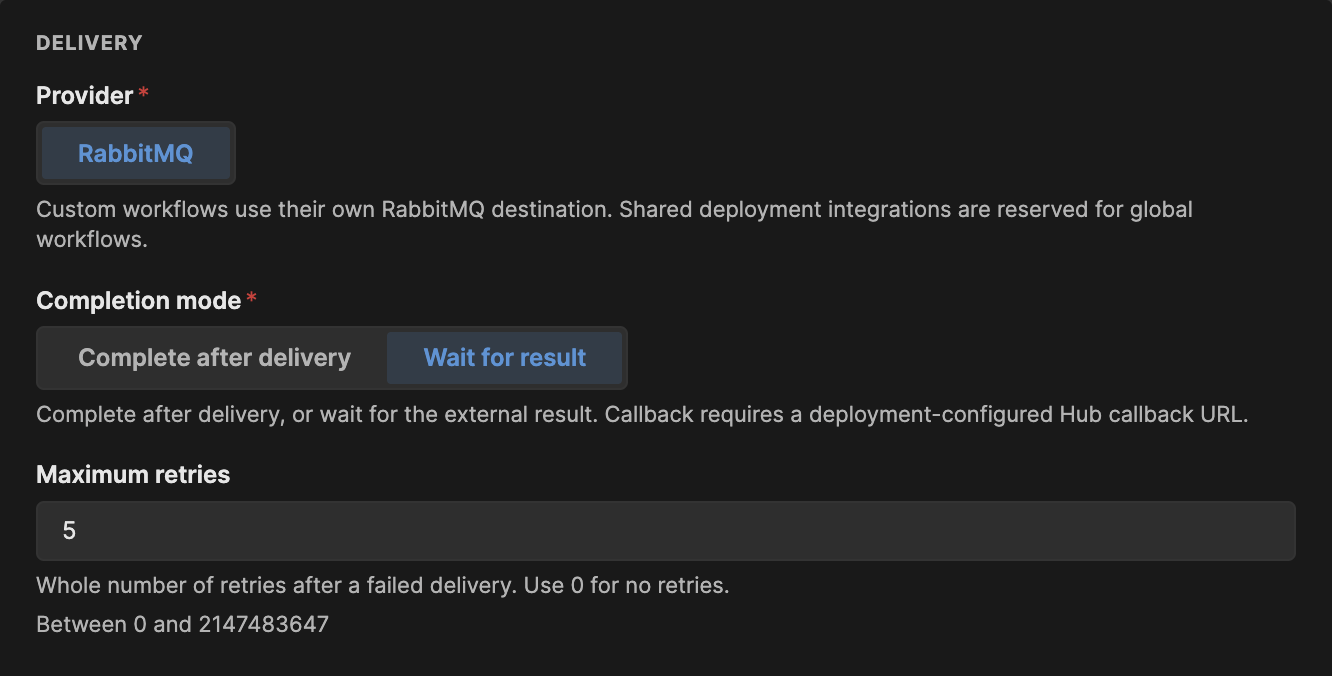
Wait for result is callback mode; Complete after delivery does not wait for external analysis.
The forwarder’s Maximum retries setting limits failed delivery retries
(the UI defaults to 5), not retries inside your external worker.
Declare destination queues creates durable quorum destination and
destination dead-letter queues when missing. If it is disabled, both must
already exist. Supply compatible queues and the appropriate declaration or
inspection permissions for the forwarder’s credentials.
Leave Destination dead-letter queue blank to use
<queue>.forwarder-dead-letter, or supply a different queue from the destination.
This setting only declares/checks the queue: configure external-consumer
dead-letter routing separately. Never use Hub’s internal failed-dispatch queue,
which may contain internal credentials, as the external dead-letter destination.
If the block is absent, the administrator must enable the forwarder service and expose its operation in the workflow catalog. Deployment-managed workflows are read-only; duplicate one to make an editable copy. The Hub callback base URL is configured on the forwarder service, not with a bearer token in the workflow designer.
Create a callback access token
The external worker authenticates as the owner of the workflow’s tenant. Agent keys and RabbitMQ credentials are not Hub callback credentials.
- Open Profile (
/profile) and select Access tokens (/profile?tab=access-tokens). This section is currently available to owner accounts. - Select Generate access token.
- In Details, supply a name of at least three characters and a description.
- In Expiry, select a short lifetime, such as 24 hours, or an exact date.
- In Permissions, select the
workflow-runsarea and enable onlyupdate. Assigned permissions should contain exactlyworkflow-runs.update. - Select Generate, copy the token from the success dialog, and store it privately before closing.
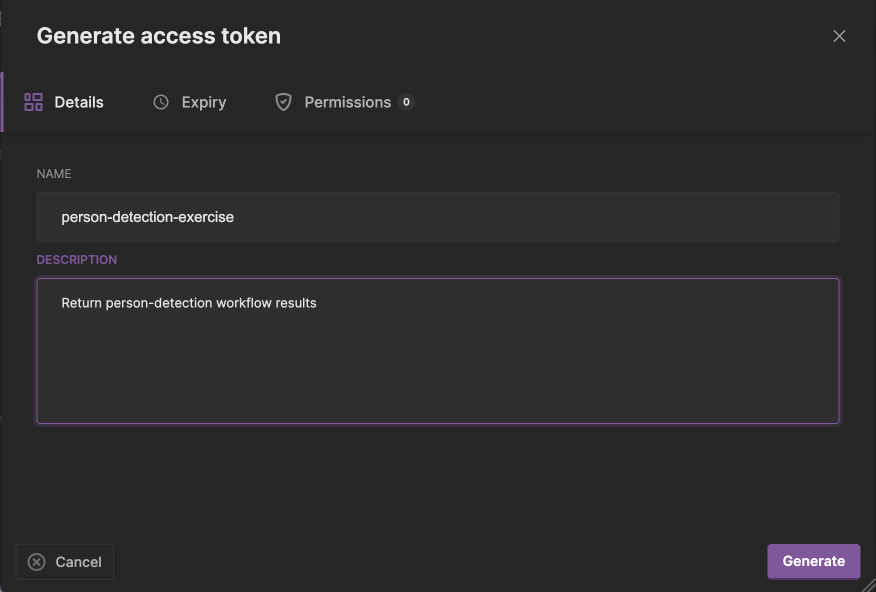
Details: provide both a name and description.
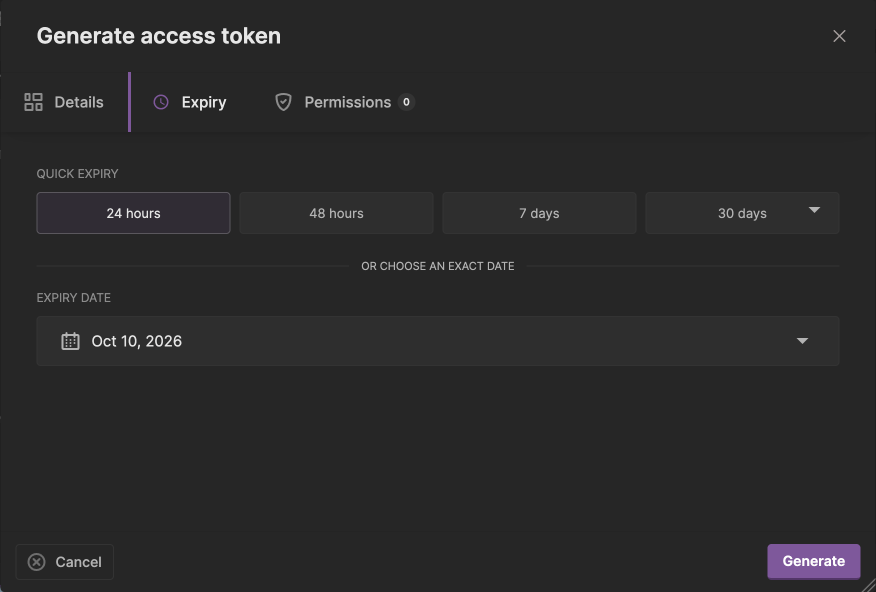
Expiry: choose a short lifetime covering the exercise, not the literal date pictured.
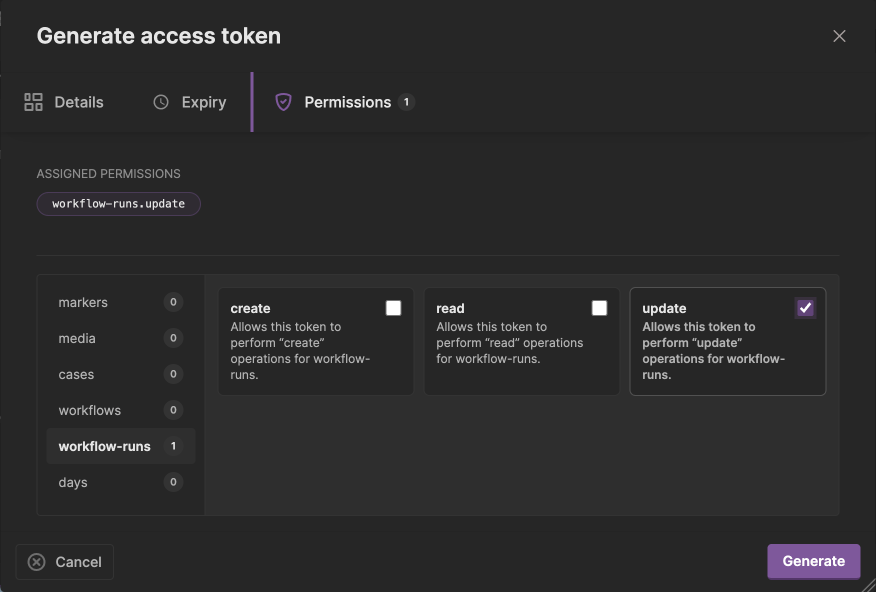
Permissions: select workflow-runs, then update only. No token was generated for these screenshots.
The copy control includes Bearer for use as an Authorization header value.
If your client adds that prefix itself, supply only the raw token. In
particular, the person-detection exercise
expects WORKFLOW_BEARER_TOKEN without Bearer . The permission identifier
is plural: workflow-runs.update, not workflow-run.update.
Use a token belonging to the correct tenant. Keep it out of workflow settings, Git, logs, and screenshots; revoke or rotate it if exposed. After testing, disable the exercise workflow and delete its token.
For a complete walkthrough with an Agent, development container, illustrated designer/token guides, YOLO person detection, and result verification, follow the Augment Vision workflow exercise.
End-to-end flow
In callback mode, the forwarder is an adapter between Hub’s internal run message and the external contract:
Hub workflows engine
        |
        | internal WorkflowRun
        v
Workflow forwarder
        |
        | safe WorkflowInvocation
        v
Customer RabbitMQ or HTTPS endpoint
        |
        | POST callback with customer's Hub token
        v
Hub API: /workflows/runs/{runId}
        |
        | trusted internal result
        v
Hub workflows engine -> downstream stages or completion- The workflows engine dispatches the
forwarderstage. - The forwarder removes internal-only data and builds a
uug.ai/workflow-invocation/v1message. - The external worker consumes the invocation and performs its work.
- The worker sends a
uug.ai/workflow-result/v1body to the callback URL from the invocation, using its own Hub access token. - Hub validates the token, tenant, run, and dispatched operation before publishing the result back to the workflows engine.
- The engine records the first accepted result and either dispatches matching downstream stages or completes the run.
The external worker never connects to Hub’s internal workflow queue and never receives a Hub credential in the invocation.
Completion modes
The binding’s completion mode decides when the forwarder stage resolves.
| Mode | Behaviour | Use when |
|---|---|---|
delivered | The forwarder resolves the stage after the customer destination confirms delivery. No callback block is included. | Delivery itself is the final outcome and Hub does not need a returned value. |
callback | Delivery leaves the stage open. The invocation includes a callback block and Hub waits for the external result. | Downstream routing or workflow completion depends on the external worker’s result. |
Use callback for an external processing stage. A successfully published
invocation does not complete that stage.
Invocation contract
The external worker receives a WorkflowInvocation, not the internal
WorkflowRun:
{
  "schema": "uug.ai/workflow-invocation/v1",
  "executionId": "wfx_8a5f...",
  "runId": "68d3fb899cad115513a781bd",
  "workflow": {
    "id": "customer-analysis",
    "name": "Customer analysis"
  },
  "stage": {
    "operation": "forwarder"
  },
  "tenant": {
    "organisationId": "6754047347321302010cafee",
    "projectId": "6754047347321302010cafee"
  },
  "media": {
    "key": "recordings/camera-1/example.mp4"
  },
  "device": {
    "key": "camera-1",
    "name": "Front entrance",
    "siteIds": ["site-1"]
  },
  "data": {
    "inputs": {},
    "results": {
      "classify": {
        "objects": ["person"]
      }
    }
  },
  "callback": {
    "url": "https://api.example.com/workflows/runs/68d3fb899cad115513a781bd",
    "method": "POST",
    "resultSchema": "uug.ai/workflow-result/v1"
  },
  "traceId": "4bf92f3577b34da6a3ce929d0e0e4736"
}
The exact data fields come from the forwarder binding. The environment-backed
RabbitMQ binding exposes the run’s inputs and accumulated results. Advanced
bindings can explicitly map a narrower set of tenant, device, media, input, or
result fields.
The boundary intentionally excludes:
- storage credentials and account storage settings;
- the internal ingest payload;
- internal lifecycle, dispatch, and resolution state;
- Hub access tokens.
A short-lived signed media URL is included only when the binding explicitly opts in.
Invocation identities
| Field | Meaning |
|---|---|
runId | The complete durable workflow run. Use it only as the run identity represented in the callback URL. |
executionId | The deterministic identity of this operation within this run. Use it as the external idempotency key. |
stage.operation | The trusted result key. Return the same value in the callback body. |
traceId | The distributed trace identifier to include in external logs and tracing when possible. |
The forwarder may redeliver an invocation after a timeout or connection
failure. The external worker should therefore deduplicate work by
executionId.
Create and provision the access token
The external service authenticates the callback with an access token created by a user in Hub. In Hub, create the token in the organisation and project whose workflow runs it will update, and grant exactly:
workflow-runs.updateThe spelling is exact and plural: workflow-runs.update.
Provision the token directly to the external service through its secret manager. Do not put it in:
- the workflow definition;
- the forwarder binding or destination;
- RabbitMQ message headers;
- the invocation body.
The Hub API verifies the token signature and its persisted access-token
binding, pins the request to the token’s organisation and project, and then
requires the workflow-runs.update scope. A valid token cannot update a run
from another project, and the requested operation must already have been
dispatched for that run.
Return the result
Read the callback URL, method, and result schema from each invocation rather than constructing the URL in the external worker:
POST /workflows/runs/68d3fb899cad115513a781bd HTTP/1.1
Host: api.example.com
Authorization: Bearer <hub-access-token>
Content-Type: application/json
{
"schema": "uug.ai/workflow-result/v1",
"stage": {
"operation": "forwarder"
},
"result": {
"decision": "allow",
"confidence": 0.94
}
}stage.operation must match the invocation’s stage.operation. A callback
must return exactly one output channel:
resultcontains routing values from a stage that persists its own output. The object becomes that operation’s entry in the workflow run’s results and can be read by downstream conditions.payloadcontains a workflow block envelope for Hub to validate and persist.
For example, a stage can ask Hub to persist a marker:
{
  "schema": "uug.ai/workflow-result/v1",
  "stage": {
    "operation": "forwarder"
  },
  "payload": {
    "blocks": [
      {
        "type": "marker",
        "data": {
          "startTimestamp": 1790258400,
          "endTimestamp": 1790258430,
          "name": "custom integration",
          "description": "Created by the customer-managed stage"
        }
      }
    ]
  }
}
Do not place blocks under result.blocks. That is routing data and is not sent
to the ingest pipeline. Hub derives the recording, organisation, project, and
device context from the stored run rather than trusting those values in the
callback. After successful ingestion, Hub mirrors the persisted blocks into the
operation’s routing result, grouped by block type, for downstream conditions.
The callback request body is limited to 1 MiB. Store large artefacts in the
customer system or an appropriate object store and return a reference and
small routing values instead. Use payload only for supported ingest blocks
that Hub should own.
Responses and retries
| Response | Meaning | External worker action |
|---|---|---|
202 Accepted | Hub validated and queued the first result for workflow processing. | Mark the callback complete. |
200 OK | The identical result was already recorded. | Treat the retry as successful. |
400 Bad Request | The schema, operation, or body is invalid. | Correct the request; do not retry unchanged. |
401 Unauthorized | The bearer token is missing, invalid, or lacks workflow-runs.update. | Replace or reconfigure the token. |
404 Not Found | The run is not visible in the token’s organisation/project, or its media is unavailable. | Verify the token binding and run. |
409 Conflict | The stage was not dispatched, or a different result already won. | Do not overwrite the accepted result. |
410 Gone | The unresolved run has already closed. | Stop retrying this result. |
503 Service Unavailable | Hub could not load, compare, rehydrate, or publish the result. | Retry with backoff. |
Callback processing is first result wins. Concurrent duplicate messages
cannot overwrite the accepted result or dispatch downstream stages twice.
Retried callbacks should send the same JSON output. A 202 confirms durable
queue acceptance, not that an ingest block has already been persisted; block
processing happens asynchronously in the workflow engine.
Configure the deployment
The Hub chart does not need provider-specific forwarder fields. Workflow
services already accept arbitrary environment variables, volumes, and mounts.
Register forwarder like any other stage, then pass its configuration through
the existing env map:
kerberoshub:
  workflows:
    enabled: true
    definitions:
      customer-analysis:
        enabled: true
        triggers:
          - type: automatic
        stages:
          - operation: forwarder
            dispatch: always

  services:
    forwarder:
      enabled: true
      repository: ghcr.io/uug-ai/hub-workflows-forwarder
      pullPolicy: IfNotPresent
      tag: "v1.0.1"
      replicas: 1
      logLevel: "info"
      queue: "kcloud-forwarder-queue.fifo"
      env:
        FORWARDER_CONFIG_FILE: "/etc/hub-workflows-forwarder/config.json"
      volumeMounts:
        - name: forwarder-config
          mountPath: /etc/hub-workflows-forwarder
          readOnly: true
      volumes:
        - name: forwarder-config
          configMap:
            name: hub-workflows-forwarder
Create the referenced ConfigMap through the deployment’s normal configuration management. The mounted JSON selects the provider, destinations, field mappings, and completion mode. For example, an HTTPS integration can use:
{
  "callback": {
    "baseUrl": "https://api.example.com"
  },
  "integrations": {
    "customer-system": {
      "provider": "webhook",
      "destinations": {
        "analyse": {
          "url": "https://customer.example.net/workflows/analyse",
          "headersFromEnv": {
            "Authorization": "CUSTOMER_API_AUTHORIZATION"
          }
        }
      }
    }
  },
  "bindings": [
    {
      "operation": "forwarder",
      "integration": "customer-system",
      "destination": "analyse",
      "completionMode": "callback",
      "fields": {
        "inputs": {
          "path": "inputs"
        },
        "results": {
          "path": "results"
        }
      }
    }
  ]
}
The ConfigMap contains routing configuration, not secrets.
CUSTOMER_API_AUTHORIZATION is the name of an environment variable provisioned
to the forwarder through the deployment’s secret management. It authenticates
delivery to the customer endpoint and is unrelated to the Hub token the
customer worker uses for the callback.
RabbitMQ convenience configuration
A deployment with one RabbitMQ destination can skip the JSON file and set the
forwarder’s supported environment variables in the same open env map:
kerberoshub:
  services:
    forwarder:
      env:
        FORWARDER_OPERATION: "forwarder"
        FORWARDER_COMPLETION_MODE: "callback"
        FORWARDER_CALLBACK_BASE_URL: "https://api.example.com"
        FORWARDER_MAX_RETRIES: "5"
        FORWARDER_RABBITMQ_HOST: "customer-rabbitmq.example.com:5671"
        FORWARDER_RABBITMQ_USERNAME: "workflow-publisher"
        FORWARDER_RABBITMQ_PASSWORD: "<from-your-secret-management-overlay>"
        FORWARDER_RABBITMQ_QUEUE: "customer-workflow-invocations"
        FORWARDER_RABBITMQ_VHOST: "/"
        FORWARDER_RABBITMQ_TLS: "true"
        FORWARDER_RABBITMQ_DECLARE_QUEUE: "false"
This destination connection is separate from Hub’s internal RABBITMQ_*
connection. Use TLS and a customer-broker account that can publish only to the
required invocation queue.
In both configurations, the callback base must be an absolute HTTPS URL. The
forwarder appends /workflows/runs/{runId}. The Helm template remains
provider-neutral: it only renders the generic service and the values supplied
through env, volumes, and mounts.
External worker checklist
- Consume and validate
uug.ai/workflow-invocation/v1. - Deduplicate processing by
executionId. - Treat
runIdandstage.operationas opaque identities. - Keep the Hub access token in a secret manager.
- Use a project-bound token with only
workflow-runs.update. - Read the callback URL and result schema from the invocation.
- Return the same operation and exactly one JSON
resultor block-envelopepayload, with a total request size no larger than 1 MiB. - Treat
202and an identical-result200as success. - Retry transient
503responses with backoff. - Include
traceIdin logs and traces.
For a stage deployed inside the Hub environment instead, use the direct queue contract in Stages. For the workflow graph and conditional routing model, return to Workflows.